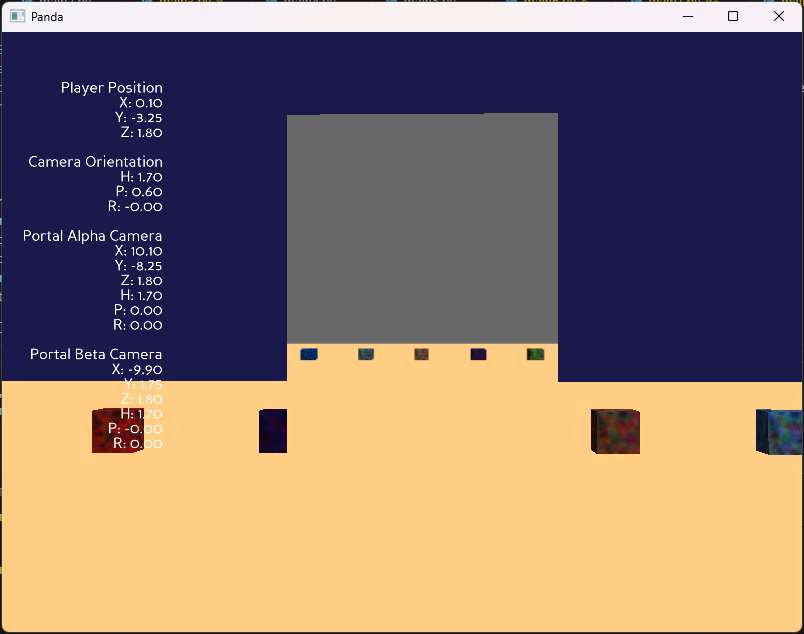
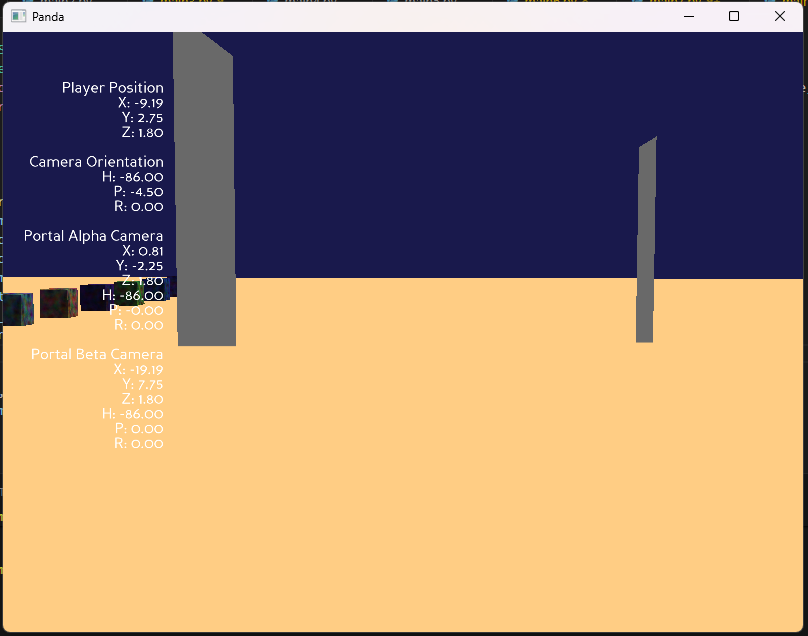
Well, i think this can be a good thing to showcase, right !?
so i made Portals in Panda3D! ( not the game, the thing!  )
)
it does 2 of the most basic things that portals do :
- Render what is on the other side of the second portal
- Teleport the player on the other side of the second portal when he enters the first one. ( and vice-versa )
( Note: i have inetnsionally elongated all the variable names, to make it better to understand, and because i find short names to be hard to remember. )
from direct.showbase.ShowBase import ShowBase
from direct.gui.OnscreenText import OnscreenText
from panda3d.core import CardMaker, Texture, Camera, PerspectiveLens, TextNode, DirectionalLight, AmbientLight, TransformState, Vec3, Quat, Shader
from direct.task import Task
import sys
import random


def transform_node_through_portal_space(source_node_path, source_portal_node, destination_portal_node):
    relative_transform_to_source_portal = source_node_path.getTransform(source_portal_node)
    rotation_quaternion = Quat()
    rotation_quaternion.setFromAxisAngle(180, Vec3.up())
    rotation_transform_state = TransformState.makeQuat(rotation_quaternion)
    rotated_relative_transform = rotation_transform_state.compose(relative_transform_to_source_portal)
    destination_world_transform = destination_portal_node.getTransform(render).compose(rotated_relative_transform)
    return destination_world_transform

def clamp_value(value, minimum_value, maximum_value):
    return max(minimum_value, min(maximum_value, value))


class Portal:
    def __init__(self, portal_name, portal_position, portal_orientation):
        self.portal_name = portal_name

        self.portal_root_node = render.attachNewNode(portal_name)
        self.portal_root_node.setPosHpr(portal_position, portal_orientation)

        portal_screen_card_maker = CardMaker("portal_screen")
        portal_screen_card_maker.setFrame(-1, 1, -2, 2)
        self.portal_screen_node = self.portal_root_node.attachNewNode(portal_screen_card_maker.generate())
        self.portal_screen_node.setPos(0, 0.01, 0)

        self.portal_camera_node = render.attachNewNode(Camera(portal_name + "_camera"))
        portal_camera_lens = PerspectiveLens()
        portal_camera_lens.setFov(75)
        self.portal_camera_node.node().setLens(portal_camera_lens)

        portal_camera_marker = loader.loadModel("models/misc/sphere")
        portal_camera_marker.reparentTo(self.portal_camera_node)
        portal_camera_marker.setScale(0.1)
        portal_camera_marker.setColor(1, 0, 0, 1)
        portal_camera_marker.setLightOff()

        self.portal_render_texture = Texture()

        portal_texture_buffer = base.win.makeTextureBuffer(portal_name + "_buffer", 512, 512)
        portal_texture_buffer.setSort(-100)

        portal_display_region = portal_texture_buffer.makeDisplayRegion()
        portal_display_region.setCamera(self.portal_camera_node)

        self.portal_render_texture = portal_texture_buffer.getTexture()
        self.portal_screen_node.setTexture(self.portal_render_texture)

        portal_surface_shader = Shader.make(
            Shader.SL_GLSL,
            vertex="""
            #version 130
            in vec4 p3d_Vertex;
            uniform mat4 p3d_ModelViewProjectionMatrix;
            out vec4 clipPosition;
            void main() {
                clipPosition = p3d_ModelViewProjectionMatrix * p3d_Vertex;
                gl_Position = clipPosition;
            }
            """,
            fragment="""
            #version 130
            uniform sampler2D portalTexture;
            in vec4 clipPosition;
            out vec4 fragmentColor;
            void main() {
                vec2 normalizedDeviceCoordinates = clipPosition.xy / clipPosition.w;
                vec2 screenSpaceUV = normalizedDeviceCoordinates * 0.5 + 0.5;
                fragmentColor = texture(portalTexture, screenSpaceUV);
            }
            """
        )

        self.portal_screen_node.setShader(portal_surface_shader)
        self.portal_screen_node.setShaderInput("portalTexture", self.portal_render_texture)

        self.previous_side_of_plane = None

    def update_portal_camera_view(self, player_node_path, linked_portal):
        transformed_camera_state = self.compute_portal_transformed_node(player_node_path, linked_portal)
        self.portal_camera_node.setTransform(render, transformed_camera_state)

    def compute_portal_transformed_node(self, source_node_path, linked_portal):
        return transform_node_through_portal_space(
            source_node_path,
            self.portal_root_node,
            linked_portal.portal_root_node
        )

    def process_entity_teleportation(self, entity_node_path, linked_portal):
        world_position = entity_node_path.getPos(render)
        local_position = self.portal_root_node.getRelativePoint(render, world_position)

        portal_half_width = 1.0
        portal_half_height = 2.0

        is_in_front_of_portal = local_position.y > 0.0

        if self.previous_side_of_plane is None:
            self.previous_side_of_plane = is_in_front_of_portal
            return

        has_crossed_portal_plane = is_in_front_of_portal != self.previous_side_of_plane

        is_within_horizontal_bounds = -portal_half_width <= local_position.x <= portal_half_width
        is_within_vertical_bounds = -portal_half_height <= local_position.z <= portal_half_height
        is_within_portal_bounds = is_within_horizontal_bounds and is_within_vertical_bounds

        if has_crossed_portal_plane and is_within_portal_bounds:
            teleported_transform = self.compute_portal_transformed_node(entity_node_path, linked_portal)
            entity_node_path.setTransform(render, teleported_transform)
            self.previous_side_of_plane = None
            linked_portal.previous_side_of_plane = None
            return

        self.previous_side_of_plane = is_in_front_of_portal


class PortalDemo(ShowBase):
    def __init__(self):
        ShowBase.__init__(self)

        self.configure_lighting()
        self.build_environment()

        self.accept("escape", sys.exit)

        self.debug_display_text = OnscreenText(
            text="",
            pos=(-0.8, 0.8),
            scale=0.05,
            align=TextNode.ARight,
            fg=(1, 1, 1, 1),
            mayChange=True
        )

        self.portal_alpha = Portal("portal_alpha", (0, 5, 1.5), (0, 0, 0))
        self.portal_beta = Portal("portal_beta", (10, 0, 1.5), (180, 0, 0))

        self.player_root_node = self.render.attachNewNode("player_root")
        self.player_root_node.setPos(0, 0, 1.8)
        self.camera.reparentTo(self.player_root_node)

        self.disableMouse()
        self.win.setClearColor((0.1, 0.1, 0.3, 1))

        self.keyboard_state = {"w": 0, "s": 0, "a": 0, "d": 0}
        for key in self.keyboard_state:
            self.accept(key, self.set_keyboard_state, [key, 1])
            self.accept(key + "-up", self.set_keyboard_state, [key, 0])

        self.taskMgr.add(self.update, "update")

    def set_keyboard_state(self, key, value):
        self.keyboard_state[key] = value

    def configure_lighting(self):
        directional_light = DirectionalLight("directional_light")
        directional_light.setColor((1, 1, 0.9, 1))
        directional_light_node = self.render.attachNewNode(directional_light)
        directional_light_node.setHpr(45, -45, 0)
        self.render.setLight(directional_light_node)

        ambient_light = AmbientLight("ambient_light")
        ambient_light.setColor((0.3, 0.3, 0.4, 1))
        ambient_light_node = self.render.attachNewNode(ambient_light)
        self.render.setLight(ambient_light_node)

    def build_environment(self):
        ground_card_maker = CardMaker("ground_plane")
        ground_card_maker.setFrame(-50, 50, -50, 50)
        ground_node = self.render.attachNewNode(ground_card_maker.generate())
        ground_node.lookAt(0, 0, -1)
        ground_node.setZ(0)
        ground_node.setColor(1, 0.8, 0.5, 1)

        sky_sphere = self.loader.loadModel("models/misc/sphere")
        sky_sphere.reparentTo(self.render)
        sky_sphere.setScale(200)
        sky_sphere.setLightOff()
        sky_sphere.setShaderOff()
        sky_sphere.setBin("background", 0)
        sky_sphere.setDepthWrite(False)
        sky_sphere.setCompass()
        sky_sphere.setColor(0.5, 0.7, 1.0, 1)

        for index in range(20):
            cube_model = self.loader.loadModel("models/box")
            cube_model.reparentTo(self.render)
            cube_model.setScale(0.5, 0.5, 0.5)
            cube_model.setPos((index * 2) - 20, 10, 0.5)
            cube_model.setColor(random.random(), random.random(), random.random(), 1)

    def update(self, task):
        mouse_data = self.win.getPointer(0)
        mouse_x = mouse_data.getX()
        mouse_y = mouse_data.getY()

        if self.win.movePointer(0, self.win.getXSize() // 2, self.win.getYSize() // 2):
            delta_x = mouse_x - self.win.getXSize() // 2
            delta_y = mouse_y - self.win.getYSize() // 2
            self.player_root_node.setH(self.player_root_node.getH() - delta_x * 0.1)
            self.camera.setP(self.camera.getP() - delta_y * 0.1)
            self.camera.setP(clamp_value(self.camera.getP(), -80, 80))

        movement_speed = 5 * globalClock.getDt()
        if self.keyboard_state["w"]:
            self.player_root_node.setY(self.player_root_node, movement_speed)
        if self.keyboard_state["s"]:
            self.player_root_node.setY(self.player_root_node, -movement_speed)
        if self.keyboard_state["a"]:
            self.player_root_node.setX(self.player_root_node, -movement_speed)
        if self.keyboard_state["d"]:
            self.player_root_node.setX(self.player_root_node, movement_speed)

        self.portal_alpha.update_portal_camera_view(self.player_root_node, self.portal_beta)
        self.portal_beta.update_portal_camera_view(self.player_root_node, self.portal_alpha)

        self.portal_alpha.process_entity_teleportation(self.player_root_node, self.portal_beta)
        self.portal_beta.process_entity_teleportation(self.player_root_node, self.portal_alpha)

        player_position = self.player_root_node.getPos(self.render)
        player_camera_orientation = self.camera.getHpr(self.render)

        portal_alpha_camera_position = self.portal_alpha.portal_camera_node.getPos(self.render)
        portal_alpha_camera_orientation = self.portal_alpha.portal_camera_node.getHpr(self.render)

        portal_beta_camera_position = self.portal_beta.portal_camera_node.getPos(self.render)
        portal_beta_camera_orientation = self.portal_beta.portal_camera_node.getHpr(self.render)

        self.debug_display_text.setText(
            f"Player Position\n"
            f"X: {player_position.x:.2f}\n"
            f"Y: {player_position.y:.2f}\n"
            f"Z: {player_position.z:.2f}\n\n"
            f"Camera Orientation\n"
            f"H: {player_camera_orientation.x:.2f}\n"
            f"P: {player_camera_orientation.y:.2f}\n"
            f"R: {player_camera_orientation.z:.2f}\n\n"
            f"Portal Alpha Camera\n"
            f"X: {portal_alpha_camera_position.x:.2f}\n"
            f"Y: {portal_alpha_camera_position.y:.2f}\n"
            f"Z: {portal_alpha_camera_position.z:.2f}\n"
            f"H: {portal_alpha_camera_orientation.x:.2f}\n"
            f"P: {portal_alpha_camera_orientation.y:.2f}\n"
            f"R: {portal_alpha_camera_orientation.z:.2f}\n\n"
            f"Portal Beta Camera\n"
            f"X: {portal_beta_camera_position.x:.2f}\n"
            f"Y: {portal_beta_camera_position.y:.2f}\n"
            f"Z: {portal_beta_camera_position.z:.2f}\n"
            f"H: {portal_beta_camera_orientation.x:.2f}\n"
            f"P: {portal_beta_camera_orientation.y:.2f}\n"
            f"R: {portal_beta_camera_orientation.z:.2f}"
        )

        return Task.cont


app = PortalDemo()
app.run()