A simplified example of creating hardware instancing, there is nothing superfluous, just the essence.
from panda3d.core import loadPrcFileData, PTA_LMatrix4f, LMatrix4f, Shader, ShaderBuffer, StringStream,\
GeomEnums, OmniBoundingVolume

from direct.showbase.ShowBase import ShowBase
from direct.actor.Actor import Actor

import random

class InstancedBasics(ShowBase):
    def __init__(self):
        ShowBase.__init__(self)
        base.cam.set_pos(0, -10.0, 0)

        # An array for two matrices.
        instanced_array = PTA_LMatrix4f.emptyArray(2)

        # Creating a transformation for 1 copy.
        scale = LMatrix4f().scale_mat((1, 1, 1.5))
        rotate_x = LMatrix4f().rotate_mat(0, (1, 0, 0))
        rotate_y = LMatrix4f().rotate_mat(0, (0, 1, 0))
        rotate_z = LMatrix4f().rotate_mat(45, (0, 0, 1))
        translate = LMatrix4f().translate_mat((0, 0, -1))

        transform = scale * ( rotate_y * rotate_x * rotate_z) * translate
        # Add the transformation matrix for 1 copy to the array.
        instanced_array.set_element(0, transform)

        # Creating a transformation for 2 copy.
        scale = LMatrix4f().scale_mat((1, 1, 1))
        rotate_x = LMatrix4f().rotate_mat(0, (1, 0, 0))
        rotate_y = LMatrix4f().rotate_mat(0, (0, 1, 0))
        rotate_z = LMatrix4f().rotate_mat(0, (0, 0, 1))
        translate = LMatrix4f().translate_mat((10, 10, 0))

        transform = scale * ( rotate_y * rotate_x * rotate_z) * translate
        # Add the transformation matrix for 2 copy to the array.
        instanced_array.set_element(1, transform)

        self.model = Actor('panda', {'walk' : 'panda-walk'})
        self.model.loop('walk')
        # A hack to disable culling.
        self.model.node().set_bounds(OmniBoundingVolume())
        self.model.node().set_final(True)
        self.model.reparent_to(render)
        # We inform the GPU that this geometry needs to be drawn in multiples of the specified number.
        self.model.set_instance_count(2)
        self.model.set_shader(Shader.load(Shader.SL_GLSL, vertex = 'shaders/instancing_vertex.glsl', fragment = 'shaders/instancing_fragment.glsl'))
        # Passing an array of two matrices to the shader.
        self.model.set_shader_input("instanced_object", ShaderBuffer('DataBuffer', StringStream(instanced_array).get_data(), GeomEnums.UH_static))

instanced_basics = InstancedBasics()
instanced_basics.run()
The shader is also simple, as well as an example of a stress test:
from panda3d.core import loadPrcFileData, PTA_LMatrix4f, LMatrix4f, Shader, ShaderBuffer, StringStream,\
 GeomEnums, OmniBoundingVolume

loadPrcFileData("", "show-frame-rate-meter #t")
loadPrcFileData("", "sync-video 0")

from direct.showbase.ShowBase import ShowBase
from direct.actor.Actor import Actor

import random

class InstancedBasics(ShowBase):
    def __init__(self):
        ShowBase.__init__(self)
        base.cam.set_pos(0, -800.0, 0)

        INSTANCE = 10000

        instanced_array = PTA_LMatrix4f.emptyArray(INSTANCE)

        for i in range(INSTANCE):
            scale = LMatrix4f().scale_mat((1, 1, 1))
            rotate_x = LMatrix4f().rotate_mat(random.uniform(-90, 90), (1, 0, 0))
            rotate_y = LMatrix4f().rotate_mat(random.uniform(-90, 90), (0, 1, 0))
            rotate_z = LMatrix4f().rotate_mat(random.uniform(-90, 90), (0, 0, 1))
            translate = LMatrix4f().translate_mat((random.uniform(-150, 150), random.uniform(-150, 150), random.uniform(-150, 150)))

            transform = scale * ( rotate_y * rotate_x * rotate_z) * translate
            instanced_array.set_element(i, transform)

        self.model = Actor('panda', {'walk' : 'panda-walk'})
        self.model.node().set_bounds(OmniBoundingVolume())
        self.model.node().set_final(True)
        self.model.loop('walk')
        self.model.reparent_to(render)

        self.model.set_instance_count(INSTANCE)
        self.model.set_shader(Shader.load(Shader.SL_GLSL, vertex = 'shaders/instancing_vertex.glsl', fragment = 'shaders/instancing_fragment.glsl'))
        self.model.set_shader_input("instanced_object", ShaderBuffer('DataBuffer', StringStream(instanced_array).get_data(), GeomEnums.UH_static))

instanced_basics = InstancedBasics()
instanced_basics.run()
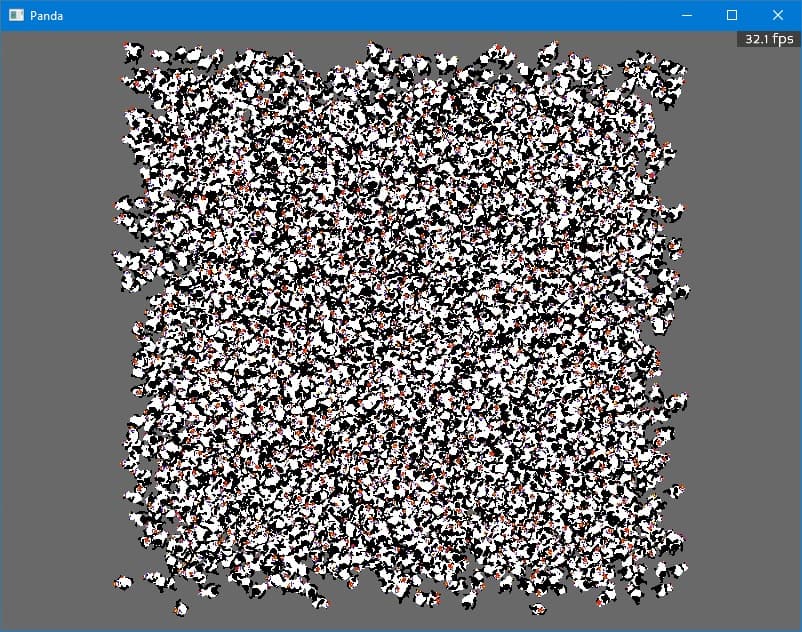
shaders.zip (803 Bytes)
