Hi all, I am currently trying to create a basic GUI (using ctkinter) in which I have two panda3D scenes side by side. Once scene is supposed to have a 3D shape in it, and the other scene is supposed to have a 2D representation of the shape. The problem I am having right now is that when I create the two Panda3D scenes with objects in both (test objects for now), I cannot rotate or move either object in each scene. This is not a problem when there is only one Panda3D scene. Any help would be great, thanks!
Well, if you need two separated windows, the only thing came to my mind is to use client-server application. It’s not so hard to make this in panda, check this Networking
Thanks, I’ll take a look! I was hoping there would be a way for Panda3D to automatically handle 2 Panda3D frames next to each other and have each update separately given user inputs, but it seems like that isn’t a built in functionality. The example I was thinking of was: 1. A user enters length, width, height of a prism. 2. The user clicks enter. 3. The prism populates in a 2D view in one frame, and a 3D view in another frame 4. I can continuously update these by changing the parameters and clicking enter 5. I can move each camera view and rotate each frame and whatnot
Your task is not entirely clear. Usually, to capture a single object from different angles, you just need to have a camera with the right transformation. You can create multiple cameras, which creates the illusion of different subject positions. If there is a problem with the location of the object, this code shows how this is achieved for a single scene.
from direct.showbase.ShowBase import ShowBase
from panda3d.core import WindowProperties, Camera, OrthographicLens, NodePath

class MyApp(ShowBase):

    def __init__(self):
        ShowBase.__init__(self)

        self.panda = loader.load_model("panda")
        self.panda.reparent_to(render)

        window_properties = WindowProperties()
        window_properties.set_size(800, 600)
        window_properties.set_title('win2')

        self.win2 = self.open_window(props = window_properties)
        display_region_win2 = self.win2.get_display_region(1)

        lens_screen = OrthographicLens()
        lens_screen.set_film_size(70, 70)
        lens_screen.set_near_far(-1000, 1000)

        camera_screen = Camera("camera_screen")
        camera_screen.set_lens(lens_screen)

        self.camera_win2 = NodePath(camera_screen)
        display_region_win2.camera = self.camera_win2

        self.camera_win2.reparent_to(render)

        taskMgr.add(self.rotate, "rotate")

    def rotate(self, task):
        t = task.time
        self.panda.set_h(t*50)

        return task.cont

app = MyApp()
app.run()
If i understood correctly, you want to create some kind of Blender. In that case it’s better to look at Display regions, since handling one window is easier than 2 windows + server app.
Than you just check what display region your’s mouse in, and do what you need.
Yes! I do want to create some kind of blender. Ideally, I’d have a 2D view u can place circles and rectangles in. When I place those in, they would automatically render in 3D in the 3D view. But I want the 2D and 3D view to be separate
Could you not just have two “root”-nodes, with a separate camera for each?
i.e. Something like this (untested):
# Note: I'm assuming that you're using ShowBase.
# If not, it just means taking some code from ShowBase and
# using it in your program, I imagine

# First, we create the root of one of our "scenes"
self.root1 = NodePath(PandaNode("root 1"))

# Then we create an off-screen buffer and a camera
# (We could probably do this with separate windows instead,
# but this is the code that I have to hand.)
self.buffer1 = self.graphicsEngine.makeOutput(self.pipe, "buffer 1", -1, frameProperties, windowProperties, GraphicsPipe.BFRefuseWindow, self.win.getGsg(), self.win)

self.camera1 = self.makeCamera(self.buffer1)
self.camera1.node().setScene(self.root1)

myLens = PerspectiveLens()
# We might want to set some lens properties, of course.
# I'm just leaving that out for brevity and clarity
self.camera1.node().setLens(myLens)

# Then we want a texture to which to send the output of our camera
self.outputTexture1 = Texture()

self.buffer1.addRenderTexture(self.outputTexture1, GraphicsOutput.RTMBindOrCopy)

# And finally, we create a quad onto which to place our rendered scene
cardMaker = CardMaker("card maker")
self.outputQuad1 = cardMaker.generate()
self.outputQuad1.reparentTo(aspect2d)
self.outputQuad1.setTexture(self.outputTexture)

# And then we repeat the above for the second root ...

# Later...
myObject1.reparentTo(self.root1)
myObject2.reparentTo(self.root2)
That way you should be able to have two separate views without having to duplicate anything else.
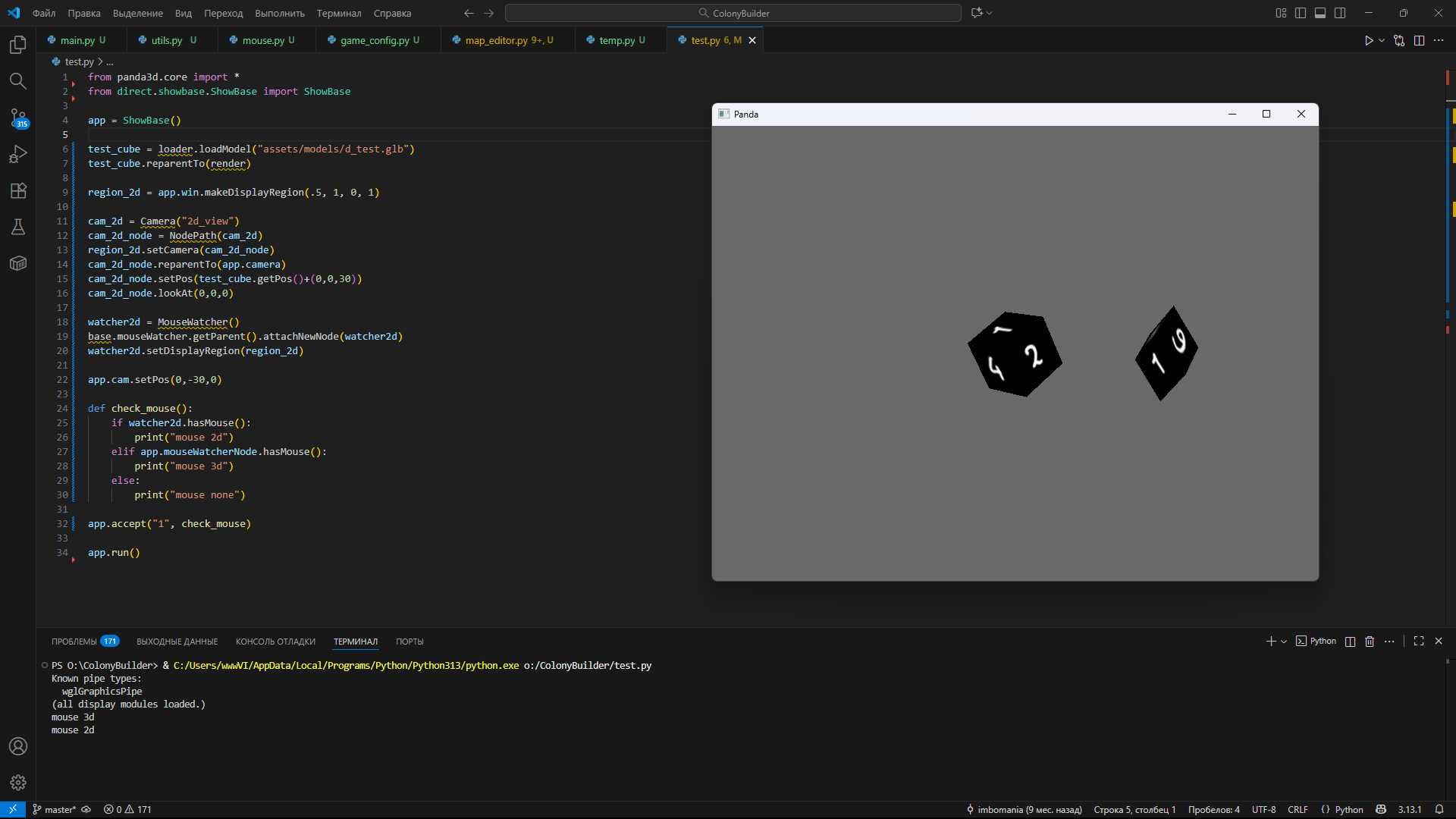
As you can see, we have 2 display regions with their own cameras and mouse watchers:
left-side is basic, created by default, and right-side is created manually. Screen is separated vertically by half, but since it’s a rough example the main camera display region owns all the window, and the same time right half of the window displays “region_2d” additionally.
In main region we watch on our cube with default camera positioning, and in 2d region we place second camera above the object, and have a top-down look.
Then, we bind key “1” and check, what region mouse points. If it points on right half of the screen, so we now in “region_2d”, and we can do whatever we need to do in “2d space”, so you need a task, to watch, what part of the screen you point.
But, as i said, if you want 2 separated windows, i think client-server-client is a good enough solution.
Hope it gives you a direction. :^)
Code
from panda3d.core import *
from direct.showbase.ShowBase import ShowBase

app = ShowBase()

test_cube = loader.loadModel("d_test.glb") #just make you're own cube in blender and place it next to the .py file
test_cube.reparentTo(render)

region_2d = app.win.makeDisplayRegion(.5, 1, 0, 1)

cam_2d = Camera("2d_view")
cam_2d_node = NodePath(cam_2d)
region_2d.setCamera(cam_2d_node)
cam_2d_node.reparentTo(app.camera)
cam_2d_node.setPos(test_cube.getPos()+(0,0,30))
cam_2d_node.lookAt(0,0,0)

watcher2d = MouseWatcher()
base.mouseWatcher.getParent().attachNewNode(watcher2d)
watcher2d.setDisplayRegion(region_2d)

app.cam.setPos(0,-30,0)

def check_mouse():
    if watcher2d.hasMouse():
        print("mouse 2d")
    elif app.mouseWatcherNode.hasMouse():
        print("mouse 3d")
    else:
        print("mouse none")

app.accept("1", check_mouse)

app.run()
1 Like