Strange display artifact

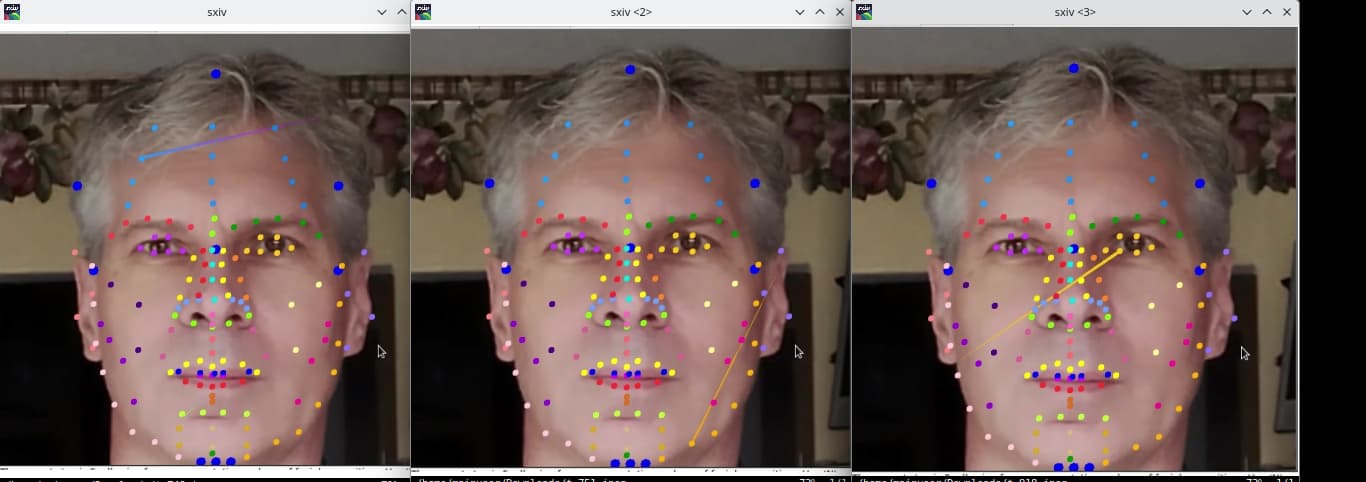
I’m not sure how to describe this one, much less search for it, so my apologies if this is a well-covered matter. Also, my apologies for a bombardment of screengrabs.

The attached images show my current project, which has two Panda windows embedded in a Tkinter gui. Both views use orthographic cameras, if that matters. Seen in both views are a number of marker dots, all of which are built from the same geometry. On the picture side, where the problem will be evident, some dots are hidden behind the picture plane, as shown in the default state in the first image, which shows no problems.

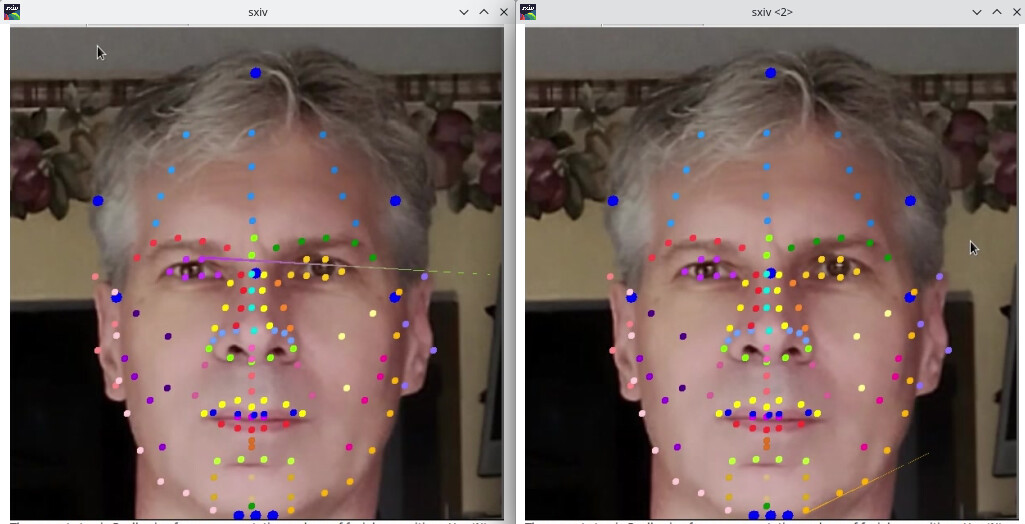
To show those hidden markers, I set the picture geometry to the background, which causes the artifacts seen in the subsequent images to start appearing at irregular intervals. I don’t even know what to call them. Zippies or jaggies, maybe, but I’ll bet drwr would have had a name for them. They zip into view and vanish. They also go away, when I remove the bin settings from the pic.

I have also seen this when I have included splines in the same scene. There, they only appear when the splines are visible.

I’m on Ubuntu, if that matters. I’ve seen this on Breath Linux and GalliumOS, both running on different repurposed Chromebooks.

I’m not particularly good with the internet back-and-forth, these days, for which I also apologize.
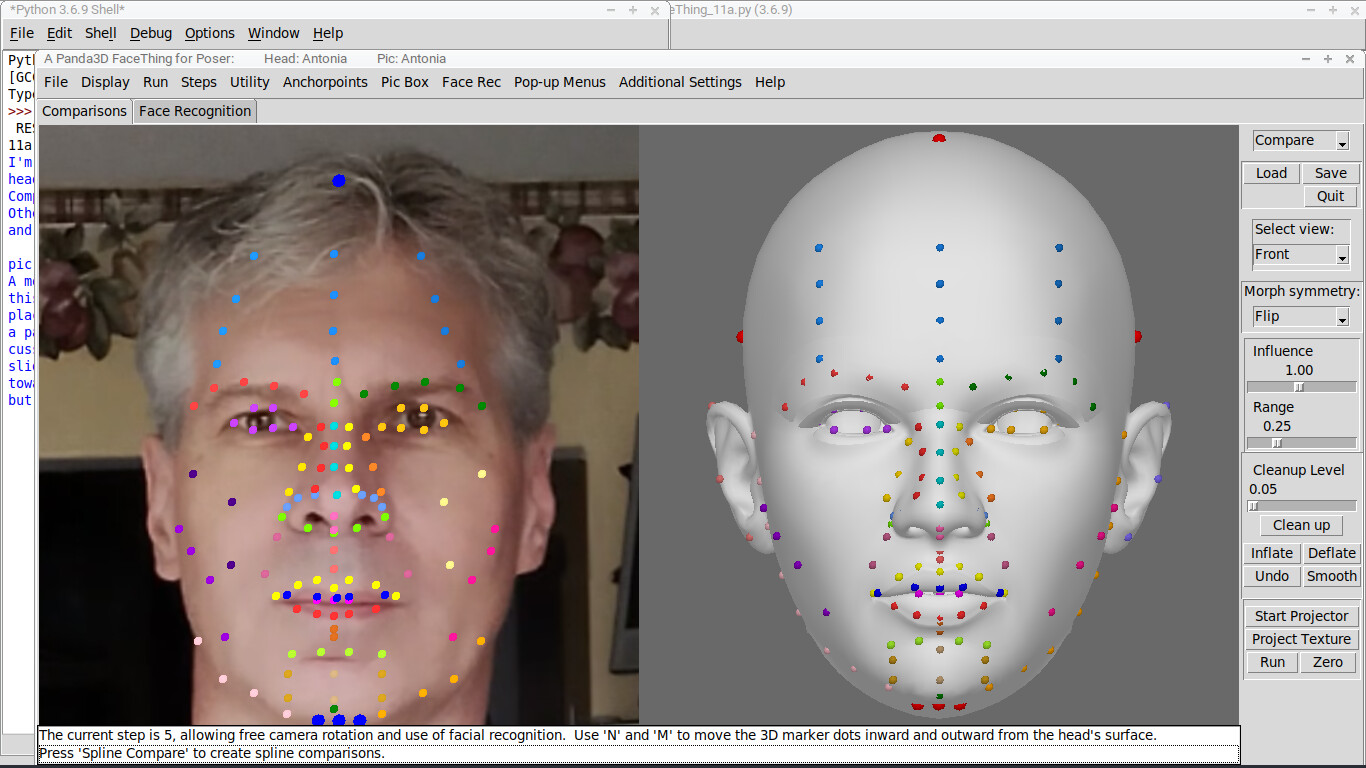
How are you rendering those dots? Are they using a custom shader, or any particular render-attributes, or anything like that?

At first glance, it looks like some of the geometry of your dots is ending up being assigned to invalid or erroneously-high positions. As though there were a division by zero occurring, or some junk data getting into the calculations somewhere.

That said, might a simpler solution to your original problem not be to just move the picture backwards far enough that it’s behind the rear-most dot?

That way you don’t have to force anything in the rendering–you can just let standard depth-testing do its work.

The picture plane was formerly placed at the back, but some functions require it to be forward in the scene, for other purposes.

The markers are created from a common geometry, which is built using vertexdata methods. They are introduced into the scene by doing objnode = render.attachNewNode(geomnode), and are all subsequently reparented to a common nodepath. I can see now how I might clean up that process. Hmm.

Formerly the markers were added using instanceTo or copyTo, but I had the same issue then, when working with the splines.

There’s nothing exotic about the dot rendering. They just have a color applied.

I’ll examine the geometry for any peculiarities.

If I had to guess, the artifacts would be a result of the orthographic camera settings.

When using an orthographic camera, objects don’t get larger as you come closer to them, and they don’t get smaller as you get farther away. You can also do a your_ortho_lens.setNearFar(-2000,2000) to capture anything in that range, whether it is in front of or behind the lens’ position.

I don’t think it should matter, considering the dots are being rendered in the right places as it stands, but you can also play with the film sizes. your_ortho_lens.setFilmSize(20,15)

Other than that, I might try calling setShaderOff() on that “common nodepath” you mentioned all the dots live under, before calling setColor() or however you’re assigning the color.

You know, looking again at the screenshot, I notice something interesting: In certain of those glitched markers, the “glitchy part” seems to change colour across its length.

This can perhaps most-easily be seen in the first glitch-screenshot (i.e. middle image, left-most screenshot, with the glitch extending from left to right). There it seems to start out purple, and shade into green.

It can also be seen on the bottom-left screenshot, in which the glitch starts out blue, and shades into purple.

It’s almost as though (some?) vertices are being shared between (some?) dots, meaning that when colour is applied to the vertices, we end up with shading from one dot’s colour to the other’s…

Yes, I think that is accurate. They also seem to “zip” into one another. That is, those singularity points seem to lead toward another dot. Could it be cycling through them, because they have a shared parent or because their geometries are shared? I saw the same pattern when I used copyTo and instanceTo instead of the approach I’ve used here.

On edit: looking at the images, I see exceptions to my observation that they zip toward one another. It may be more random.

Yeah, I suspected the same thing–and saw the same counter-evidence.

That said, there is conversely the possibility that they’re “zipping” towards another dot/vertex-position as it would be without some transformation that’s being applied…

Hum… could we perhaps see the code that makes and places the dots? In fact, if feasible, do you think that you could put together some sort of minimal demonstrative example, please? That might provide more insight, and/or allow us to experiment and debug on our ends.

I don’t think I can currently reduce this thing to what you want, no. I don’t have the skills, time, or patience for that. I’m happy to share the source code for the project, but tearing it down and rebuilding parts of it as a neat, little sample is beyond me. It’s not that sort of project and mine is not that sort of brain.

I can say that the lens setup and the way the markers are put into the scene don’t seem to be the cause. The setShaderOff idea was a bust, too.

I’ll keep tinkering with this and let you know if I determine anything. Thanks.

All right, if you’re willing to share the source-code, please do. (If it’s long, ideally please don’t paste it into here; share it offsite with a link.)

(That is, presuming that your sharing the code wouldn’t have any negative effects–e.g. legal issues, or trouble from an employer, or privacy violations with regards to underlying data, etc.)

As promised, I’m back with an update. Testing revealed problems with my geometry-creation process, which were fixed, but that did not solve the problem.

What has solved the problem is setting

self.taskMgr.globalClock.setMode(ClockObject.MLimited)
self.taskMgr.globalClock.setFrameRate(60)

My assumption is that the problem results from having two Panda windows embedded in a Tkinter framework. Tk limits Panda to 60 fps, and varying that creates definite problems, if you try to monkey with the Showbase settings. Panda’s frame rate is 35-ish tops, with this setup, as the embedded Panda windows split their permitted updates among themselves. Once I add marker dots, approximately 300 between the two windows, the fps drops to 24-25. I was using the default clock mode, which apparently doesn’t adapt well to the described conditions. I’m guessing that I was glimpsing bits of something that Panda usually hides between frames, but its rhythms were thrown off by all the Tks and extra windows and what-all.

Anyway, that fixed it. I’m responding to you specifically, because that seems to be my only way into the thread? I would reply at the thread-level, addressing the room, and not to you in particular, given the option. No offense.

Back in 2023, I posted about a problem with with “roughness” of Panda’s Pusher collisions becoming visible when I had one object pseudo-parented to another via Python code (not using Panda’s built-in process). David Rose explained in a thread here somewhere, way back when, that the Pusher collisions are actually “noisy”, with the from object penetrating the into object but being popped out again between rendered frames, hidden from view. I was seeing that, and the solution there was to split my pseudo-parenting process into two parts, one before the render-step and one after.

I’m prattling on about this because I figure this current problem was similar, in showing a glimpse of something Panda is maybe always doing, but we never get to see it unless something interferes with the normal process that keeps it hidden away. I may be wrong about that. In my only vague understanding of the deeper workings of the engine, the situations seem similar to me.

That’s all, then. Thanks for the help. I’m going back to lurking, where I’m a viking.

Hold on, there’s a “Reply” button at the bottom, too, and now I don’t know which one I pressed. I am mixed up again, as is typical of me. Ah, well.

2 Likes