Problem with finding animations in gltf file using actor class

Hello,
I am new to panda3d and am trying create an animated entity using the actor class.
I have exported the models using block bench as a gltf file which has 2 animations within it however the actor.getAnimNames() method returns an empty list. I have additionally thrown the method within a try catch statement which returns the error : list index out of range. The model itself also loads completely fine however the animation’s do not play.

Any help would be greatly appreciated.

The code:


from ursina import *
from ursina.shaders import lit_with_shadows_shader
from direct.actor.Actor import Actor

app = Ursina()

pig = Entity(model=load_model("path the gltf"), rotation=(0, 90, 0))

model_path = load_model("path the gltf")

actor = Actor(model_path, {"WalkAnimation": "path the gltf"})
actor.reparent_to(pig)

def update():
    actor.loop('WalkAnimation')
    try:
        anim_names = actor.getAnimNames()
        current_anim = actor.getCurrentAnim()
        print(anim_names)
        print(current_anim)
    except Exception as e:
        print(f"Error accessing animations: {e}")

app.run()

the models? Also, Blockbench allows the user to create bones?
I need a bit more detail on your models, I don’t want to jump to conclusions.
However, I’d like to point out that if your models don’t have bones, you’ll need to use ursina’s FrameAnimation3d prefab :wink:

Hello and thank you for your response.
Yes I believe block bench does allow for you to create bones through pivot points which are used for animations. It also allows for these models to be exported as a gltf file. I am also able to export as a obj and export the animations as json files. I have read through the gltf file and it does include the animations. I’m unsure if the issue is with ursina or with the file. If there is an alternative method for running the animations as well that would be helpful to know.

Greetings! (To both of you!) Welcome to the forums, and I hope that you find your time here to be positive! :slight_smile:

So, let me start by saying that, if the problem turns out to lie with Ursina, then it might be more helpful to take this to an Ursina-specific venue.

That said, the problem may of course lie elsewhere, so let’s investigate…

First of all, lachdigger, do you have “panda3d-gltf” installed? (Or does Ursina perhaps install it…?)

Second–and once panda3d-gltf has been confirmed to be installed–you might try viewing your model in the “gltf-viewer” command-line program. See whether the animations show up there…

(For more on both of these–including installation of panda3d-gltf if you don’t have it–take a look at the following manual page:
https://docs.panda3d.org/1.10/python/pipeline/gltf-files
)

And finally, would you be willing to try to create a simple test-model that exhibits this same issue? Something like a simple cube with a basic back-and-forth animation.

If so, then that might give us something to examine on our end, to perhaps find a potential source of the problem.

To eliminate unnecessary confusion about the problem with the engine, you need to make the animation play in the standard glTF format viewer from Khronos

1 Like

Hello,

I have ensured that panda3d-gltf has been installed.
I tried view it through the command-line how ever it could not be loaded/opened.
I also got a message saying: :framework(warning): Empty bounding volume for models.

I had created a rotating cube test model through block bench which was also animated however experienced similar issues with that as well. Was also unable to view it through command line.

Lastly I used gltf viewer from Khronos and the model loaded completely fine with its animations.

You need to keep in mind that Panda3D only supports bone and morph animations. Object animation is currently not possible.

The animations should be and bone and morph. They were animated within block bench using it’s animator.

Okay, that’s interesting–and only more so that the model showed up in the Khronos viewer.

It sounds like there’s a compatibility issue somewhere: the exporter for Blockbench is producing output that doesn’t match what Panda3D expects, I’d guess.

Would you be willing to share the “rotating cube” model, please, so that we can examine it?

testCube.gltf (5.2 KB)
sure here is the cube model.

When I load your model through the interface of the actor class, I get this message.

:Actor(warning): testCube.gltf is not a character!

This means that the model has no bone armature. Accordingly, the animation cannot be played.

I see, thank you.
Do you know if there is a way I can add in bone armatures through block bench? Or should I try and use another 3D software like blender and if so would I have to re-animate the models?

That’s what I thought, since you’re using Ursina, you should be using Blender, yes. And if you’re creating animations without bone armature, you’ll need to go through the FrameAnimation3d prefab :+1:

I actually managed to play animations from glTF models exported from Blockbench in Panda3D.

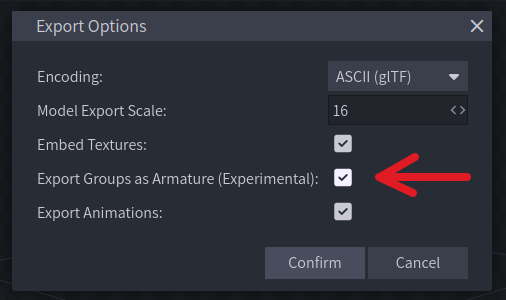
I don’t know when this became available since I only discovered Blockbench a couple days ago, but the version I’m using (latest one at the time of writing, 4.12.6) has an experimental feature to “Export Groups as Armature”, as shown in the image (which depicts the glTF export dialog).

I’m attaching the original blockbench file and texture, plus the exported glTF since the files are very small (I was just playing a bit with the software for the first time). The glTF file already has the texture embedded, though, so you don’t need the other files to load it in Panda3D, only the panda3d-gltf lib.

totem_model.zip (4.1 KB)

Again, it is an experimental feature, but I hope it ends up integrated into the software forever, since it is so handy and effective. Look at what can be created with it, very charming graphics.

Also, since we are talking about lighter 3D modelling tools, will you listen to some light venting that is relevant to the theme? I do hope the ideas shared here are helpful in some way or another, or at least thought-provoking. Here I go.

I love, love, love, love Blender, but its growth also increased its hardware requirements (understandably so). My 4GB laptop can’t even launch the latest version, so I’m forced to rely on LTS versions before 3.0 (which will eventually stop getting updates in the future). I don’t want to upgrade my hardware now or in the future just so I can launch a software to make assets to use in a much lower-spec game. I rather use the funds for other more essential project needs.

On top of that, regardless of hardware requirements Blender’s scope as a tool is much, much larger than what I need for low-spec game projects. While Blender has several window layouts (workspaces), Blockbench has only 3 or 4: one for modelling, one for painting and another for animating.

It is not better than Blender (nor worse either, ofc), it is just that its tools and interface are specialized for voxel or low-poly modelling, and with suitable lower hardware requirements. I’m still only experimenting with it, but with what I’ve seen so far I suspect it may even speed up the kind of workflow I’m looking for, that is, low-poly models with simple (but charming and detailed) pixel-art(-ish) graphics (something like FF7, Trails in the Sky, Chrono Cross).

I hope the Blockbench project keeps doing great and more open-source software like it pops up as well in the future. We need more specialized 3D modelling/painting/animation tools with requirements fit for such purposes.

Speaking of which, if I’m not mistaken, I remember several years ago talk about a “Lite”, more lightweight version of Blender, or something like that, from the very people who made and maintains it (perhaps they thought that with its growth, Blender would become too large for certain small basic 3D needs, I don’t know, just speculating at this point).

See how Autodesk has Maya, but also Tinkercad. We need lighter more specialized tools that are quicker to use so people can exercise their creativity more often in a medium with more limitations (like using blocks, voxels, low-poly meshs, etc.).

That’s all I wanted to share. Thank you for coming to my TED Talk.

1 Like

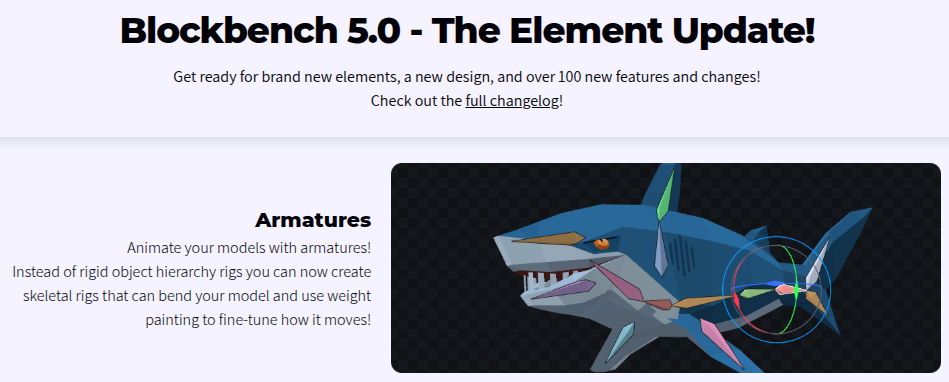
Also relevant to this thread: A recent update to BlockBench also finally brought armatures (skeletal rigs) to the app (among other features).

2 Likes

That totem thing also any animated in Blockbench object is strobing and skip frame
too hard. I think Blockbench export group as Armature still very buggy.