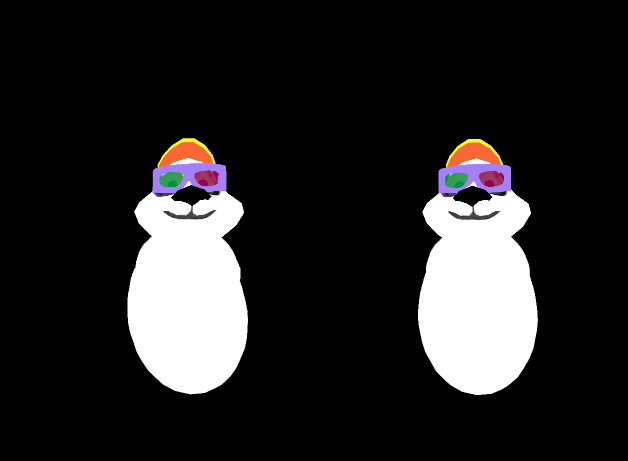
After letting it rest for a long while, I finalized the first usable version of my library to integrate OpenXR with Panda3D :
It is still very basic and limited, but it already supports mono and stereo views, HMD tracking, and hands position tracking. Contrary to OpenVR, OpenXR does not define a manifest language to define the actions, so I must first design an easy way to do it (and in line with what other engines are doing right now ). And sadly the same applies to skeletons.
Right now it is only available from source, I will publish a wheel version once I have a basic support for actions and created a simple mechanism to link Panda object to tracked elements.
Edit: To avoid package name hijacking, I pushed a first release on PyPi. You can now install the library using pip :
pip install panda3d-openxr
To make it work without needing to modify the Panda source code, I had to use the draw callbacks to reconfigure the OpenGL framebuffer and bind the textures provided by OpenXR instead of the one created by Panda. I don’t think this is the most effective way of doing this. I will probably in the future submit a feature request to optimize this, one I have a clear view of how everything works !
I am sorry it is 4h50am I just had AI fix something but I have no idea what they fixed and it is working on windows, connected with hard wire to meta quest 3 via meta quest app.
I see the panda and the cubes for the hand controllers are working. I wanted to push a pull request on github, I just am used to working in Ubuntu. and also I didn’t have time to run a diff and see what AI actually did. I am sorry to just dump this here, but I was hoping it may help somebody, and I plan to come back to this later. thanx
# main_actual_fixed.py
# Panda3D + OpenXR minimal example with improved format override patch for Meta Quest 3S via Link

from direct.showbase.ShowBase import ShowBase
from panda3d.core import LPoint3
from p3dopenxr.p3dopenxr import P3DOpenXR

# ────────────────────────────────────────────────
# Monkey-patch the swapchain creation to force REAL GL enum values
# ────────────────────────────────────────────────
import p3dopenxr.swapchain as swapchain_module

# Store the original Swapchain.__init__
original_swapchain_init = swapchain_module.Swapchain.__init__

def patched_swapchain_init(self, session, view, sc_format=None, sample_count=1):
    print(f"Creating swapchain for view, original requested format: {sc_format} (type: {type(sc_format)})")

    # REAL OpenGL internalformat enums that Quest Link + OpenGL usually accepts
    # Order: prefer sRGB for gamma correctness, then linear RGBA, then others
    preferred_formats = [
        0x8C43,   # GL_SRGB8_ALPHA8     (preferred for Quest - gamma correct)
        0x8058,   # GL_RGBA8            (linear fallback - very common)
        0x881B,   # GL_RGB16F           (HDR-ish if supported)
        0x8059,   # GL_RGB10_A2         (high precision)
    ]

    # Optional: try to log actual runtime formats if the method exists
    if hasattr(session, 'get_swapchain_formats'):
        try:
            real_formats = session.get_swapchain_formats()
            print("Actual runtime-reported format IDs:", [hex(f) for f in real_formats])
        except Exception as ex:
            print("Could not enumerate runtime formats:", ex)

    success = False
    for fmt in preferred_formats:
        print(f"Trying format {hex(fmt)} ({fmt})...")
        try:
            original_swapchain_init(self, session, view, sc_format=fmt, sample_count=sample_count)
            print(f"✓ Success with format {hex(fmt)}!")
            success = True
            break
        except Exception as e:
            print(f"Format {hex(fmt)} failed: {e}")

    if not success:
        raise RuntimeError(
            "No compatible color format found. "
            "If depth swapchain is being created first, try commenting it out in p3dopenxr/p3dopenxr.py"
        )

# Apply the patch
swapchain_module.Swapchain.__init__ = patched_swapchain_init

# ────────────────────────────────────────────────
# Main application
# ────────────────────────────────────────────────

base = ShowBase()
base.setFrameRateMeter(True)

openxr = P3DOpenXR()

print("Initializing OpenXR with REAL GL format patch...")

try:
    openxr.init()
    print("✓ OpenXR initialized successfully!")
except Exception as e:
    print(f"✗ Initialization failed: {e}")
    print("\nPlease paste the full output (especially any 'Actual runtime-reported format IDs')")
    base.userExit()
    import sys
    sys.exit(1)

# Scene setup
print("\nSetting up VR scene...")

panda = base.loader.loadModel("panda")
if not panda:
    panda = base.loader.loadModel("models/panda-model")
    if not panda:
        panda = base.loader.loadModel("models/panda")

if panda:
    panda.reparentTo(base.render)
    min_bounds, max_bounds = panda.get_tight_bounds()
    height = max_bounds.get_z() - min_bounds.get_z()
    panda.set_scale(1.5 / height)
    panda.set_pos(0, 1, -min_bounds.get_z() / height * 1.5)
    print("✓ Panda model loaded and positioned")
else:
    print("⚠ Panda model not found")

left_hand = base.loader.loadModel("box")
if left_hand:
    left_hand.set_pos(LPoint3(-0.5) * 0.1)
    left_hand.set_scale(0.1)
    if hasattr(openxr, 'left_hand_anchor'):
        left_hand.reparent_to(openxr.left_hand_anchor)
        print("✓ Left hand controller attached")

right_hand = base.loader.loadModel("box")
if right_hand:
    right_hand.set_pos(LPoint3(0.5) * 0.1)
    right_hand.set_scale(0.1)
    if hasattr(openxr, 'right_hand_anchor'):
        right_hand.reparent_to(openxr.right_hand_anchor)
        print("✓ Right hand controller attached")

base.accept('escape', base.userExit)
base.accept('b', base.bufferViewer.toggleEnable)

print("\n" + "="*50)
print("VR APPLICATION READY!")
print("="*50)
print("1. Make sure Quest 3S is connected via Link and Oculus app is running")
print("2. Put on the headset right after starting the script")
print("3. Press ESC to exit")
print("="*50)

base.run()
Hello, development is slow but still ongoing (free time is a spare resource, sadly).
I’ve got a bunch of bugfixes and improvements, but I want to finalize proper bones support before making a new release, which should be done in a couple of weeks hopefully, otherwise I will do an intermediate release with only the bugfixes and the improved actions support.
 ). And sadly the same applies to skeletons.