ffmpegVideoCursor - MovieTexture with higher bpp

I am reading movie files in higher depth than the typical 8bit per pixel. I have two pipes of doing it, one through my own external thread with oiio GitHub - AcademySoftwareFoundation/OpenImageIO: Reading, writing, and processing images in a wide variety of file formats, using a format-agnostic API, aimed at VFX applications.

And also with the MovieTexture from Panda3d which goes through ffmpeg as we all know.

I really like the efficiency of the internal Panda3d MovieTexture. It handles pretty well seeking and overall loading and management. The problem I have is that it only provides data in 8bits per pixel/24bits images/data to the texture.

Digging in the Panda code, I found the convertion that is done in line 131 of ffmpegVideoCursor.cxx
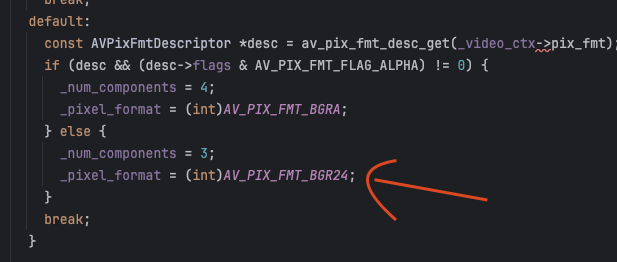
So my instinct was to change that to

_pixel_format = (int)AV_PIX_FMT_BGR48LE;

from the ffmpeg docs. And then changing the texture to the different depth.

It “kind” of works. I avoid color banding but seems that the mapping of my data is wrong. It is not a shader s/t values, but is something in the data is read when copyied from memory.

I tried multiple ComponentType and Format in the texture, and the best combo was:

movieTexture.set_component_type(Texture.T_unsigned_short)
movieTexture.set_format(Texture.F_rgb16)

Which give me correct color and image depth, but the image is cropped and duplicated. Here the snapshot of the texture in a polygon 1920x1080
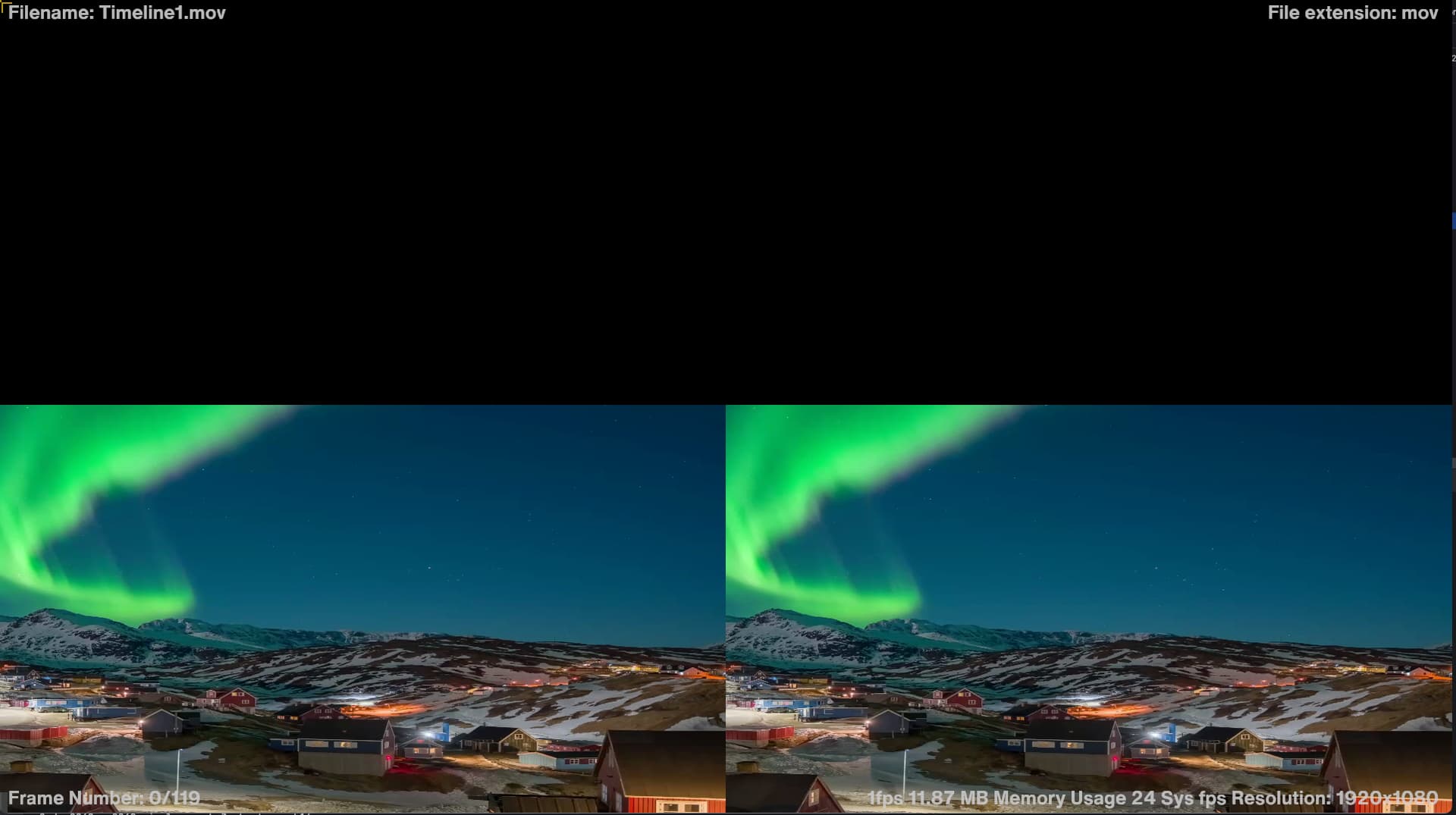
While the same video with

_pixel_format = (int)AV_PIX_FMT_BGR24;

and

movieTexture.set_component_type(Texture.T_unsigned_byte)
movieTexture.set_format(Texture.F_rgb)

Looks correct (But with some posterization because its rendered in 8bpp)

Wondering if anyone has any idea what I am doing wrong or what is the right combo/management of the texture/data process from ffmpeg all the way to the texture to make it work right.

Thanks so much in advance!

1 Like

Those should be the right settings, but I think some linesize somewhere is probably computed wrong. Maybe in FfmpegVideoCursor::export_frame? That linesize might need to be multiplied by 2 in your case.

If you can’t figure it out please open a GitHub issue attaching a video file that has such a pixel format.

Thanks so much for pointing me to the source of the issue.

It’s fixed (and learned a bunch on ffmpeg and file formats!)

Here the solution:

In the file ffmpegVideoCursor.cxx

-replace in FfmpegVideoCursor::init_from

  //_pixel_format = (int)AV_PIX_FMT_BGR24;
  _pixel_format = (int)AV_PIX_FMT_BGR48LE;

This sets the output of sws_scale on FfmpegVideoCursor::export_frame to a 16bit per channel output.

One of the great things I discovered, is that ffmpeg handles nicely the input to this new output conversion. So independent to the input bitdepth, our output will be consistently 16bpp.

on FfmpegVideoCursor::export_frame replace the following two lines:

_frame_out->data[0] = buffer->_block + ((_size_y - 1) * _size_x * _num_components);
_frame_out->linesize[0] = _size_x * -_num_components;

To the following:

_frame_out->data[0] = buffer->_block + ((_size_y - 1) * (_size_x*2) * _num_components);
_frame_out->linesize[0] = (_size_x*2) * -_num_components;

This simply adds the extra padding of the buffer and linesize to allow the 16 bits. Don’t know if there is a more elegant way to do it but this works.

Then on FfmpegVideoCursor::make_new_buffer add the same “twice the size” so the buffer is created with the proper length on each row:

  //PT(FfmpegBuffer) frame = new FfmpegBuffer(size_x() * size_y() * get_num_components(), _video_timebase);
    PT(FfmpegBuffer) frame = new FfmpegBuffer((size_x()*2) * size_y() * get_num_components(), _video_timebase);

Lastly, in the file movieVideoCursor.cxx

In MovieVideoCursor::apply_to_texture

    //memcpy(data, buffer->_block, size_x() * size_y() * get_num_components());
    memcpy(data, buffer->_block, (size_x()*2) * size_y() * get_num_components());

And as mentioned in a previous post, once we create the MovieTexture in our scene, it should be of format rgb16 and component type T_unsigned_short

With this, every movie read will be tendered to a 16bpp texture. This makes sense in example when loading an HDR 422 10 bit prores video, or similar. If the scene is setup correctly, it will show the footage with no banding or artifacts.

This makes sense now that formats for HDR are being used more often.

It would be great to incorporate a config flag that changes from 8bpp to 16bpp MovieTexture. Happy to help on that but I never added a public feature to a project, so don’t know exactly how to do it.

Charlie