Hi all!
I have a human rig with the usual bones (generated in blender). I need to set the orientation of each bone independently, so I want to set the hpr referenced to the render or model coordinate system, and not referenced to the parent coordinate system.
I have tried to detach the node of the child, and also to reparent the child to the scene, but when I move the parent (for example the upperarm) the child (lowerarm) is still moving to maintain the same orientation between them.
One idea is to calculate always the orientation of the child when the parent change to keep the position, but it will kill completely my program.
In blender there is an option to create the link between parent and child only for position or only for rotation, but when I export my blend to bam seems that this info is not included.
Any ideas?
Thank you!!!
bone_np.set_hpr(reference_space_np, h, p, r)
Most operations on NodePaths allow you to give another NodePath, relative to which the operation will be. A common use case is to adjust the rotation of an object relative to itself.
spaceship.set_h(spaceship, yaw_speed * dt)
Thanks for the info!!
I have the problem when I change the position of the parent (upperarm), due to it change automatically the position of the children, and I want the children to maintain his position referenced to the world, and not referenced to the parent.
If I move the children, I can use your solutions, but there is any option to “break” the link between parent and children for rotation like on Blender?
Thanks!!!
CompassEffect can be employed for this exact purpose. Usually it’s used for letting the heading ignore the rotation of the parent node, but you can use it to make any transform element track any node in question.
Hi rdb,
So you mean to apply a compassEffect to the child, right?
If I want the joint to have the same coordinate system that the world, what is the correct node that I must use to link my children?
I tryed with
self.hand_joint.setCompass()
as per default it’s linking the joint to render, but when I move the upperarm, the lowerarm is still moving, but the rotation is still 0,0,0 (from his referente POV).
I’m actually printing the rotation of the upper arm and the lower arm, and moving with the keys the upperarm in ±5 degrees. When I move the upperarm, I see in the draw how it moves, and the orientation changes to (5,0,0) as expected. The lower arm is also remaining at (0,0,0) as expected, but graphicaly the arm has moved due to the orientation (0,0,0) is against the upperarm.
I want to be able to move the upperarm to any position, and graphicaly see that the lower arm is still in his initial position.
Thanks!!!
Update:
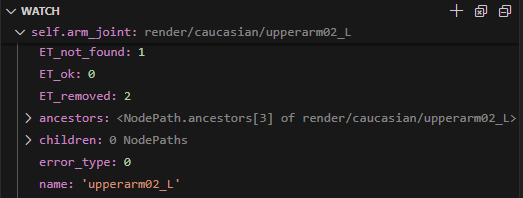
I have tried to see the children of my arm, and try to break the relationship, but the strange thing is that when I debug my code, it says that my node don’t have childrens!!!
I think I misunderstood something here completely…
The default CompassEffect–the one created by the method that you mentioned above–affects only rotation, I believe.
However, CompassEffect can be set up to affect position, too. (Amongst other attributes.)
This is done by creating a custom CompassEffect–passing to its constructor a value indicating what attributes you want it to affect. This custom CompassEffect is then applied to your NodePath via the “setEffect” method.
(The “setEffect” method being a bit more general than the “setCompass” method, I believe. In fact, it can be used to apply other types of effect, too!)
Something like this (untested):
# Make a CompassEffect that affects position and rotation
# (I'm not sure that addition is the appropriate operation below,
#  but it looks like it should be. I stand to be corrected, however!)
compassEffect = CompassEffect.make(render, CompassEffect.P_pos + CompassEffect.P_rot)
myNodePath.setEffect(compassEffect)
Hi!
I have tryed with the compass effect, breaking the parent relation, reparenting to other bone… but in all the tries I also have the same effect, when I rotate the upperarm, the lowerarm is also rotated. I want to rotate the upperarm and see that the lowerarm is not rotated. Any clue?
Thanks!!!
Hmm, you’re right: experimenting a bit, CompassEffect doesn’t seem to work on controlled joints.
And the simple option of placing the joint relative to “render” seems to produce unexpected results.
Even using “getRelativePoint” to attempt to generate a position in the space of the joint (or the joint’s parent) doesn’t seem to work as expected…
However, it looks like I can place a joint relative to “render” if I first expose its parent, then get the desired point relative to that parent, and then place the target joint at that new relative point.
Something like this:
# Place a joint at 0, 30, 0 relative to "render":
jointParent = model.exposeJoint(None, "modelRoot", parentJointName)
joint = self.model.controlJoint(None, "modelRoot", desiredJointName)

relativePoint = jointParent.getRelativePoint(render, Vec3(0, 30, 0))
joint.setPos(relativePoint)
I haven’t experimented to see whether the node-paths produced by “exposeJoint” reflect any changes made to them via “controlJoint”, and thus whether you could just expose and control all of your joints and re-use the resultant node-paths–or whether you’d have to expose, control, and release the joints for every operation…
Thanks for the hint!!!
I has been doing some tries with ExposeJoint and ControlJoint, and these are my findings:
Test1: Rotate the parent and check the rotation of the children before and after, with children exposed BEFORE movement.
Steps:
- Expose Parent
- Control Parent
- Expose Children
- Read Children rotation (against render)
- Move Parent
- Read Children rotation (against render)
Expected result:
- Children rotation has been changed
Read result:
- Children rotation don’t change
Test2: Rotate the parent and check the rotation of the children before and after, with children exposed AFTER movement.
Expected result:
- Children rotation is different from the original one from render
Real result:
- Children rotation is different from the original one from render
SO, it seems that when I expose the Joint I can get the rotation of the joint, but if I move it later through the parent, the exposed joint is not updating the rotation.
I have tried removing the exposed joint before movement and exposing again after movement, but in all the cases the result is the same, I always have the position of the joint that it has when I exposed it the first time…
Has anyone any clue? Do you have the same results? Perhaps I have some issues with my model…
Hmm… Well, two things occur to me:
First, you say that you move the parent, then check the child’s rotation. If by “move” you mean “set the position of”, then indeed, moving something doesn’t generally affect its rotation.
And second and likely more relevant, I’m pretty sure that an exposed joint always expresses its transform (including rotation) relative to its parent.
(I’m not sure that specifying a joint relative to which to measure its transform actually works in this case. That is, when calling, for example, “getHpr” on an exposed joint, I suspect that “getHpr()” and “getHpr(render)” do the same thing.)
So, unless you’ve moved–or rotated–the child (not the parent), its transform relative to the parent should be unchanged.
This “always relative to the parent” thing is the reason that the approach that I posted above uses “getRelativePoint”: it changes the render-relative point into a joint-parent-relative point, allowing the joint to be effectively placed relative to “render”.
i have method to do this its probably not the best way,
step 1
create a backup of the file to leave unmodified
in the blend file you want to unparent the bone you wanna control
step 2
create a dupe bone where your parented bone was to copy position data/rotation data
have it parented the way your unparented bone was
step 3
exposeJoint your dupe bone
no modifying the dupe bone
now control the unparented bone
and setpos/rotation to the dupe bone
setpos is the main thing to use if you wanna modify rotation
you can either use a manual set rotation or a copy from the dupe bone
this is how i have it
        self.hand_R = self.player.controlJoint( None, "modelRoot", "hand.R" )
        self.hand_L = self.player.controlJoint( None, "modelRoot", "hand.L" )

        self.handtar_R=self.player.exposeJoint( None, "modelRoot", "handtr.R" ) <dupe bone
        self.handtar_L=self.player.exposeJoint( None, "modelRoot", "handtr.L" ) <dupe bone
how it should look deform should be turned off on the dupe bones, you can use bone copy transform constraint to return the bone to the correct dupe bone
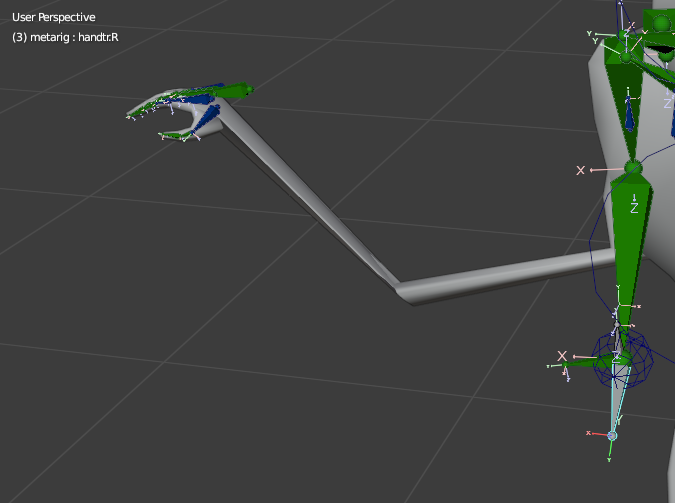
in a loop this how i set the rotation maybe different for your model mine needed flipped
                self.hand_R.setPos(self.render,self.handtar_R.getPos(self.render)) < setpos to the dupe bone

                hpr = self.handtar_R.getHpr(self.render)<optional


                self.hand_R.setHpr(self.render, hpr)


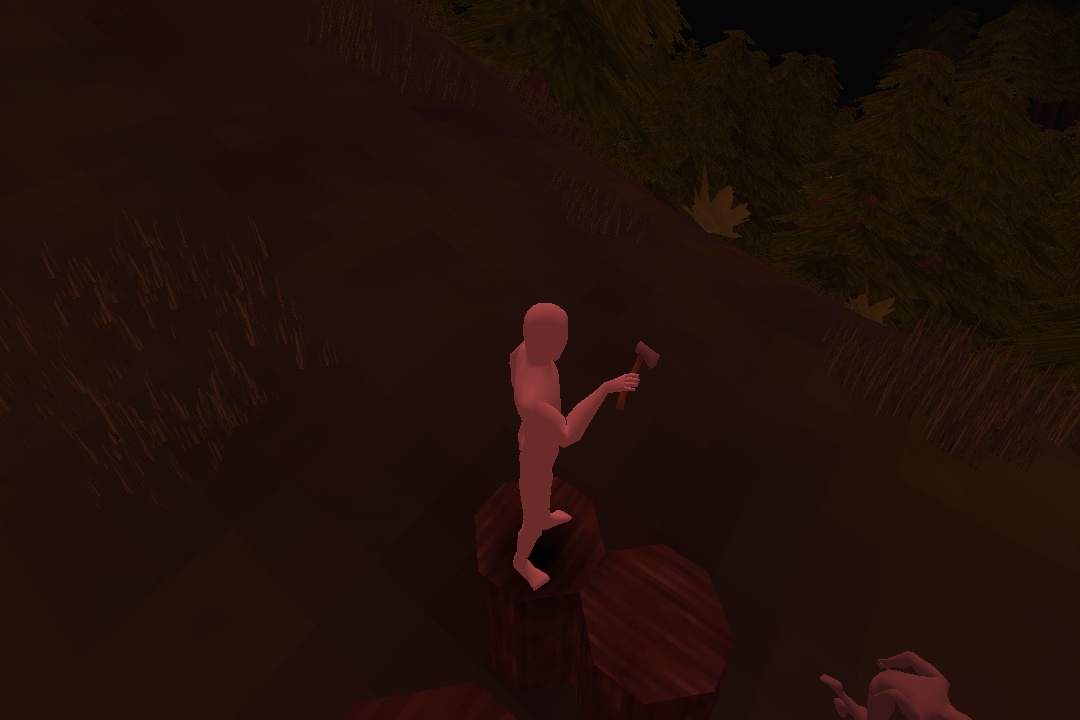
                self.hand_R.setHpr(self.hand_R, Vec3(0, 0, 180)) <optional can be manually set instead of copying from dupe bone
this the hand with a manually set rotation still using the position of the dupe bone
Thanks both!
Miswording, I’m always rotating the joints, never moving.
I don’t get this point, but I will try again and recheck my findings.
So in your code you create a new NodePath, named relativePoint, right? And this relative Point is… what? A NodePath copyng the position of jointParent?
@Trent you mean to create a second bone, unconnected, in my blend model, just in the same position that the children bone that I want to control and know the position, right?
No. The “relativePoint” object is, well, a Point3. (Like a Vec3… but a point instead of a vector.) Essentially a set of coordinates identifying a position.
What happens is this:
- We expose the parent of the joint that we want to control
- We determine the location–a point–relative to “render”, at which we want the joint to be placed
- (I think that I thought, for some reason, that you were setting the position of your joints. See below for discussion of rotating them…)
- We transform that location so that it’s relative to the parent that we exposed above
- And finally, we set the position of the joint that we want to control to be the new, transformed location.
Now, you say that you’re rotating, not moving, your joints. That may complicate things a bit.
I think that the following works–although I’m not certain.
In short, what it does is similar to the above, but instead of using “getRelativePoint” to transform a point, it uses Panda’s support for quaternions to transform a rotation.
(If you’re not familiar with quaternions, don’t worry too much. The main thing here is that they’re a way of representing rotations.)
It goes something like this:
# The HPR-values that we want to set our joint to have, relative to "render",
# stored in a vector. The components are simply H, P, and R, in that order
desiredHpr = Vec3(90, 0, 0)

# As before, we control the joint that we want to rotate,
# and expose the parent of that joint
jointParent = model.exposeJoint(None, "modelRoot", parentJointName)
joint = self.model.controlJoint(None, "modelRoot", desiredJointName)

# Now, we get the rotation of the parent-joint relative to "render",
# as a quaternion:
parentQuat = jointParent.getQuat(render)

# Next, we convert our desired HPR values into a quaternion of their own:
desiredQuat = Quat()
desiredQuat.setHpr(desiredHpr)

# Then we use the parent-quaternion to transform the desired quaternion:
newQuat = parentQuat * desiredQuat

# And finally, we apply this new quaternion as the new rotation of
# our joint:
joint.setQuat(newQuat)
Ok, I will try it.
Update:
@Thaumaturge the problem is that I’m reading from an exposed joint and trying to set the new coordinate in a controled joint, and it start to move like crazy.
But thanks to your comments I has been able to find a solution:
When you move a parent, with a controlJoint, one way to know how it’s affecting to the child is with the read of the hpr of the exposed child referenced to the controlled parent. So, if you read the hpr position of the children before and after the parent is moved, you can substract the delta from the children controlled joint and then you can maintain the children position.
actualHpr = self.lowerleg_R_exposed.getHpr(self.upperleg_R)
self.upperleg_R.setHpr(h_mov, p_mov, r_mov)
newHpr = self.lowerleg_R_exposed.getHpr(self.upperleg_R)
deltaHpr = newHpr - actualHpr
self.lowerleg_R.setHpr(self.lowerleg_R.getHpr() + deltaHpr)
One interesting point, if you generate a controlled joint and an exposed joint from the same bone… THEY DON’T HAVE THE SAME ROTATION!!! (neither the position)

It’s expected?
Second Update:
My solution only works properly for H rotations, for p and r rotations it don’t have the desired movement. I’m trying to work now with Quaternions and see how can I fix it.
What I’m trying is, after the movement of the parent, move the children to retain his rotation relative to render.
the unconnected bone will be the one that controls the mesh, the 2nd bone will be parented to the rest the armature, just used has a placeholder, then you can setpos/hpr of the unconnected bone to what you want, i don’t recommend using my method if you found something else that works, heres the blend file to look through if that helps
mannequin.zip (2.0 MB)
After loooong looong tries, I have found a solution:
- Create an _exposed of the parent
- Reparent the children controled node to the _exposed parent
- Then the setHpr referenced to render will work, and the controlled children node position and rotation agains render will work as expected.
Thanks for all the support!!!
PD: be careful with the node computation. Once you set the parent, the new child position is not computated until the new frame is calculated. If you set the parent rotation and the child rotation referenced to render in the same frame, could be that Panda3D will first compute the children referenced to render and later the parent, moving the children depending on parent movement.
I’m not sure if there is a way to force the node calculations to be sure the children is moved later, but I will try to force the node calculation after parent rotation, and later set the children rotation.