Any Suggestions or Tips to improve this effect

I was attempting to recreate a fireball visual effect in panda3d.
Here is a link to what I was attempting to recreate(only the very first effect in the opening).
And this is what I could do.
I decided to go for a more generic fireball look as that was easier but I’m still dissapointed with the results. Any tips or suggestions to make the effect more visually appealing or similar to what I was attempting to copy???
Also I made my version using:

A bright glowing sphere model with a pointlight attached to it and the bloom filter enabled and using the motion trail demo:

self.ball = self.loader.loadModel("models/icosphere")
...
self.ball.setColor(150, 0.5, 0, 1.0)
...
filters = CommonFilters(self.win, self.cam )
filters.setBloom(blend=(10, 10, 10, 0), desat=-0.5, intensity=0.4, size="large")
...
ball_light = PointLight("ball-light")
ball_light.setColor((50, 50, 0, 1))
plnp = self.ball.attachNewNode(ball_light)
plnp.setPos(self.ball.getPos() + Vec3(-15, 0, -2))
ball_light.setAttenuation(LVector3(0.7, 0.05, 0))
self.render.setLight(plnp)
...
self.flame_colors = (
            Vec4(1.5, 0.5, 0.0, 1),
            Vec4(1.3, 0.5, 0.1, 1),
            Vec4(0.2, 0.2, 0.2, 1),
            Vec4(1.0, 0.0, 0.0, 1),
        )

fire_trail = MotionTrail("fire trail", self.ball)
fire_trail.register_motion_trail()
fire_trail.geom_node_path.reparent_to(self.render)
fire_trail.set_texture(self.loader.load_texture("models/plasma.png"))
fire_trail.time_window = 0.5
center = self.render.attach_new_node("center")
around = center.attach_new_node("around")
around.set_z(1)
center = self.render.attach_new_node("center")
around = center.attach_new_node("around")
radius = 2.0  # make this bigger for a larger circle
around.set_pos(0, 0, radius)  # offset from center by desired radius

res = 4
for i in range(res + 1):
        center.set_r((360.0 / res) * i)
        vertex_pos = around.get_pos(self.render)
        fire_trail.add_vertex(vertex_pos)

        start_color = self.flame_colors[i % len(self.flame_colors)] * 1.7
        end_color = Vec4(1, 1, 0, 1)
        fire_trail.set_vertex_color(i, start_color, end_color)

LerpHprInterval(fire_trail, 20, (0, 0, -360)).loop()
LerpTexOffsetInterval(fire_trail.geom_node_path, 4, (1, 1), (1, 0)).loop()
fire_trail.update_vertices()

I’d love any videos or resources for being able to make visual effects with Panda3d or any suggestions or tips.
Such effects are not created so primitively. This video shows well how this is achieved, the bottom line is that you need additional geometry plus animated texturing.

If you achieve this effect in a blender first, only then can you think about how to transfer it to Panda3D.

1 Like

Thank you but also when trying to recreate special effects what components should be done in blender and which ones in Panda3d. For example in the example video the fireball effects had some lights, smoke, motion trails and sparks if i wanted to recreate that should I attempt to recreate the whole thing blender or just the main shape and then use Panda3ds particle generator for sparks or smoke or other effects
(I apologise if this is a bit of a vague question)

If you look at it, then light and particles can be implemented by a shader, so that the participation of Panda3D is minimal. As for the motion trace, it’s a procedural geometry if you want to create a 3D volumetric effect. Here it is worth paying attention to the study of the internal structures of the engine. For example: MeshDrawer — Panda3D Manual

You should carefully study this section and shader programming.

What is currently available in Panda3D: particles, traces of movement, and a shader generator, it’s all a very primitive implementation that doesn’t interact with each other.

For example, materials and lighting, if you have seen the demo versions of Panda3D, then I think you will find the difference between this video, I implemented this on top, using shaders and site materials. https://learnopengl.com/

Thinking about it, the difference between the standard shaders in Panda3D and its own is obvious.

I can’t say how to do this in Panda3D or Python as I’m in the process of learning those. I can say how I achieved fireball effects in BlitzBasic.

In Blitz I would create a semi transparent texture depicting a fire ball shape with all the edges completely transparent. This would be applied to a bill board sprite - a simple two triangle mesh that always faces the camera. Blitz offers a render mode for textures - providing similar effects to those that might be found in a paint app. I used a Multiply effect - a binary sum that combines the bits in the sprite with the bits on the screen it overlays. This creates an ‘entity’ to be used in a home brew particle engine responsible for spawning, moving and rotating (to create some flicker) and then fading and respawning the particle/sprite. The combination of many sprites multiplied as they are overlaid creates an intense area of light where sprites overlap.

This basic effect can then be modified by using animation and the colour of textures, scaling, random positional transformation and rotation to get the desired style.

The original image you link to seems to use a couple of different particle effects combined together including complex textured meshes. That does imply the use of custom shaders but I’d be surprised - and a bit disappointed - if Panda3D couldn’t support something similar within its existing feature set.

Thank you that’s very helpful do you have a video or screenshot of the effect you made?

Aside from what others have said above:

I note that your trail is simply linear: a set of straight lines behind the fireball. In the effect to which you linked, note that the trail actually curves, spiraling around the axis along which the fireball moves.

I also note that you seem to have some issues with the trail and the smoke “fighting” each other. I’d suggest turning off depth-testing for the trail and forcing it to render after the smoke, so that it’s always visible.

As to the ball itself, I think that one issue may be that it’s a little too distinct within the whole effect: it doesn’t blend in with the rest. You’ve already had a suggestion above from Pantopony as to how to address this, I think.

Well, there is a question here: do we know that the fireball trail-effect in the original video can follow a curved path?

Because, if the fireball is only required to fly in straight lines, then the path could be traced using static geometry (maybe with some random rotation for variety) that uses a shader to reveal more of the path with time, at a rate matching the flight-speed of the fireball.

1 Like

Yes. However, I should first point out that I misled you slightly in my original reply. It isn’t Multiply that has to be used. It’s Addition.
This is explained on this page of the manual : Texture Modes — Panda3D Manual

Just tried to add the screen-shot but this site doesn’t accept .BMP files. I need to convert them but I can’t do it on this device. Will post later.

1 Like


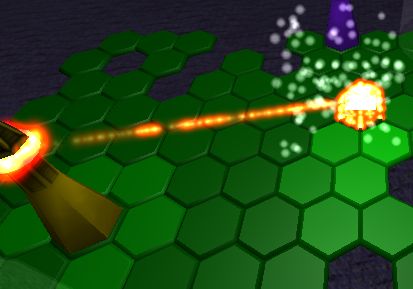
A couple of frames from a game from 2006. The effect on the Bishop-like object is streams of fireballs moving around a circular path. The ray coming out is a stream of fireballs spawning at random intervals and then travelling toward the pawn. The fireball is as I described using a texture that is a monochrome image with a colour tint that is probably a dark orange. Where fireballs overlap the Addition mode intensifies the colour to nearer white. This is the basis for most fire effects. The rest is down to animation by programming the behaviour of particles.

I never released this game. I decided the effects weren’t good enough!

1 Like